
Scheduler+ integration
Supported Mopar.com and participating Stellantis brand-site bookings can flow into your existing myKaarma scheduler.
One place to understand what your dealership is receiving, what changes on day one, how to use Scheduler+ and Mobile Check-In, and where to get help.
Mopar Service Gateway (MSG) is an all-in-one platform integrated with certified Service Lane Technology (SLT) partners and designed to elevate service efficiently, improve customer experience, and drive workshop performance. Through myKaarma, supported MSG appointments and vehicle information appear in the products your team already uses. Your go-live email remains the source of truth for which components are enabled and when.
It identifies the exact experience enabled for your store. The cards below explain the relationship between Scheduler+, Mobile Check-In, and Mopar Diagnostic Pod data.
Supported Mopar.com and participating Stellantis brand-site bookings can flow into your existing myKaarma scheduler.
Eligible stores can open OEM DATA during check-in to review supported MSG information for the VIN.
At stores using Mobile Check-In and supported Mopar Diagnostic Pods, current pod data can appear after the vehicle is podded and the VIN is matched.
Supported appointments booked on Mopar.com or participating Stellantis brand sites can land in myKaarma against real advisor availability.
Depending on your enabled setup and the VIN, users can review supported vehicle information, warranty coverage, existing service contracts, and service history.
For eligible Mobile Check-In stores using supported pods, current odometer, tire pressures, pod status, and diagnostic trouble codes can appear in OEM DATA.
Existing service contracts may be shown as view-only information when they are returned for the VIN. Selling new service contracts is not included in the pilot and is planned for a later release. The integration will continue to add services and workflow enhancements over time.
This page covers only the myKaarma MSG integration. Continue any OEM or dealership process that your go-live communication does not explicitly replace.
Your experience depends on whether myKaarma Mobile Check-In is enabled and whether your store uses supported Mopar Diagnostic Pods.
Choose the option that best describes your current setup. Your go-live email confirms the final enabled components.
Not sure? Ask your service manager or myKaarma representative whether Mobile Check-In is enabled. If your store owns pods but does not use Mobile Check-In, select the third option.
We will show exactly what turns on, who needs training, and the day-one workflow for your dealership.
| Capability | Scheduler+ only | Mobile Check-In, no Mopar Diagnostic Pod | Mobile Check-In + Mopar Diagnostic Pod |
|---|---|---|---|
| Mopar.com and brand-site appointments in Scheduler+ | Yes | Yes | Yes |
| Campaign and relevant vehicle-history information in Scheduler+ | Yes* | Yes* | Yes* |
| OEM DATA button in Mobile Check-In | No | Yes | Yes |
| Vehicle info, warranty, existing service contracts, and service history in Mobile Check-In | Not available in myKaarma check-in | View-only when returned | View-only when returned |
| Pod status, DTCs, current mileage, and tire pressure | No | No | After podding |
* Your go-live confirmation controls. Scheduler and Mobile Check-In are separate integration surfaces, and available data varies by dealership configuration and VIN. Existing service contracts are view-only during the pilot. Factory menus apply only where separately configured.
The complete experience can connect the customer booking, supported vehicle information, available pod-derived diagnostics, and repair-order workflow inside myKaarma. Stores receive only the components confirmed for their setup.
The customer schedules through Mopar.com or a participating Stellantis brand site.
The appointment lands in Scheduler+ against real advisor availability. No re-entry is required.
Where enabled and returned for the VIN, warranty coverage, existing service contracts, service history, campaign information, and other MSG data can support the visit.
At eligible Mobile Check-In stores using supported pods, diagnostic data follows after podding and a correct VIN match.
The advisor reviews the data in myKaarma, finishes check-in, and generates the repair order.
Online appointments arrive in the myKaarma scheduler your team already manages. The integration also makes it easier to review available campaign and vehicle-history information while working the appointment.
Your rollout email tells you when to begin monitoring for these bookings. Draft review: confirm the production source label before dealer distribution.
The customer chooses a dealership, service, and available appointment time through Mopar.com or an eligible Stellantis brand site.
When creating or reviewing an appointment, select CAMPAIGNS to review available campaign and vehicle-history information returned through MSG.
Review the customer and vehicle details, then add applicable campaign work to the scheduled appointment. This helps the lane prepare before the customer arrives.
Eligible Mobile Check-In users can open OEM DATA from the check-in workflow. Stores using supported Mopar Diagnostic Pods can receive additional current pod-derived data after podding the vehicle and confirming the VIN.
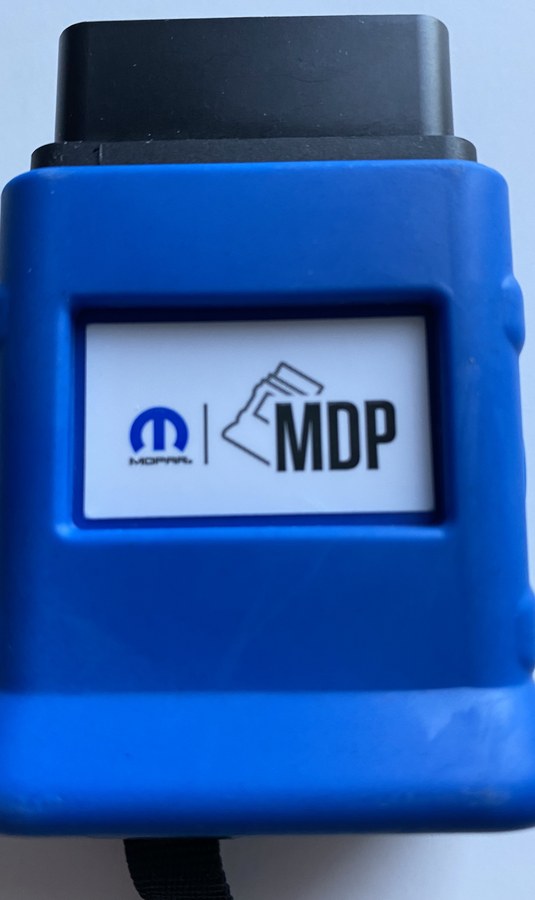
Podding transmits current pod-derived vehicle information to Mopar Service Gateway. It is required to retrieve updated pod status, DTCs, mileage, and tire pressures in myKaarma.
Your OEM DATA screen can still display supported non-pod MSG information returned for the VIN. Pod status and current pod-derived diagnostics will not appear.
Submit your pod details first. After Stellantis completes the required configuration on its end, use the MSG VCI Setup Utility instructions to update and configure the pod.
Provide your dealership and pod details to Stellantis before beginning the VCI update.
Stellantis uses the submitted pod details to complete the required configuration on its end.
Run the pod through the MSG VCI Setup Utility by following the supplied instructions.
Call the Hardware Help Desk at 855-942-3847 and select the Hardware option.
Connect the Mopar Diagnostic Pod before beginning check-in so current pod-derived vehicle information can reach MSG.
Availability varies by dealership setup and by the data returned for a specific VIN.
Year, make, model, trim, in-service date, and other available vehicle details.
Device type, status, current mileage, and tire pressures when Mopar Diagnostic Pod data is available.
Current DTC information returned after a supported Mopar Diagnostic Pod connection.
Available warranty coverage and factory service history returned for the VIN.
Existing service-contract information may be shown for reference. Selling new service contracts is coming in a later release.
MSG and Mopar Diagnostic Pod information is presented in OEM DATA to support the write-up. Printing and additional workflow actions are planned enhancements.
Activation is coordinated between myKaarma and Stellantis and is not immediate. Processing time can vary, so wait for your dealership’s go-live confirmation before changing the team’s workflow.
myKaarma confirms your Stellantis brand and dealer code, plus the Scheduler and Mobile Check-In products required for your setup.
myKaarma enables Scheduler and/or Mobile Check-In MSG capabilities based on the approved dealership use case.
myKaarma communicates the enabled and eligible dealership through the rollout process.
Stellantis processes the dealership and completes the OEM-side connection. Processing time can vary, and your dealership will be notified when the connection is ready.
Your rollout communication confirms what is enabled, what your users should do, and when to begin monitoring the new workflow.
Use the rollout email or contact the pilot support team with your dealership name and dealer code.
This center is designed to support current users, new hires, managers, and anyone troubleshooting the workflow after the initial rollout communication.
Use this training video with Scheduler+, Mobile Check-In, advisor, and manager users based on the experience enabled for your dealership.
Watch the mKU training videoReview step-by-step instructions and screenshots for Scheduler+ and Mobile Check-In.
Open support articleOpen the pilot flyer for a concise overview of the program, workflow, dealer expectations, and support model.
Open pilot flyerMopar Service Gateway, or MSG, is an all-in-one platform integrated with certified Service Lane Technology (SLT) partners and designed to elevate service efficiently, improve customer experience, and drive workshop performance. Through myKaarma, supported appointments and OEM information can appear in Scheduler+ and Mobile Check-In.
The rollout supports Chrysler, Dodge, Jeep, Ram, FIAT, and Alfa Romeo dealerships when the correct brand and dealer code are configured. Your go-live communication confirms whether your specific dealership is enabled.
No. Customers can continue booking through Mopar.com or participating brand sites. Supported appointments then flow into the myKaarma Scheduler+ workflow your team already uses.
Your go-live email confirms the source label used for your rollout. After activation, look for Stellantis in Scheduler+.
Activation happens in stages. myKaarma enables the applicable integration, the OEM-side connection is completed, and your dealership receives go-live guidance. Begin monitoring the new workflow only after that confirmation arrives.
No. Your go-live communication identifies the components enabled for your store. The common experiences are Scheduler+ only, Scheduler+ with Mobile Check-In OEM DATA, and Scheduler+ with Mobile Check-In plus Mopar Diagnostic Pod data.
No. The integration adds only the Scheduler+ and Mobile Check-In capabilities confirmed for your dealership. Continue any existing process that your go-live communication does not explicitly replace.
No. Scheduler+ and Mobile Check-In are separate integration surfaces. A dealership can receive supported appointments in Scheduler+ without using myKaarma Mobile Check-In.
Only dealerships using a supported Mopar Diagnostic Pod should complete the pod step. Pod the vehicle before Mobile Check-In when current pod status, DTCs, mileage, and tire pressures are needed. Stores without a Mopar Diagnostic Pod can continue with the supported non-pod OEM DATA experience.
Select the Scheduler+ only experience on this page. Owning a Mopar Diagnostic Pod does not, by itself, surface pod data in myKaarma. The OEM DATA screen requires myKaarma Mobile Check-In.
First, confirm your dealership has received go-live guidance and that Mobile Check-In is enabled. Next, verify the correct VIN is connected. At pod-enabled stores, pod the vehicle before check-in. If the information is still missing, contact the pilot support team with the dealership, VIN, user, and approximate time.
No. When the correct VIN is already linked to the appointment or customer profile, myKaarma can use it. Scan or search only when the VIN is missing or incorrect.
Availability depends on your dealership setup, the VIN, and the information returned through MSG. It may include vehicle details, Mopar Diagnostic Pod information, DTCs, warranty coverage, existing service contracts, and service history.
No. Dealers may be able to view existing service-contract information returned for the VIN, but selling new service contracts is not included in the pilot. That capability is planned for a later production release.
Not yet. During the pilot, OEM DATA is primarily a reference experience. Printing and using this information in additional myKaarma workflows are planned enhancements as the integration progresses.
Yes. The pilot establishes the core Scheduler+ and Mobile Check-In workflows. Additional services and workflow enhancements will be introduced over time, and myKaarma will communicate when they become available.
No additional cost during the current pilot.
Complete the Stellantis Pod Configuration Form first. After Stellantis completes the required configuration, follow the MSG VCI update instructions. For update assistance, call the Hardware Help Desk at 855-942-3847 and select the Hardware option.
For pod hardware, update, pairing, or network-configuration assistance, call the Hardware Help Desk at 855-942-3847 and select the Hardware option. Contact the myKaarma pilot team when the issue affects Scheduler+ or Mobile Check-In, or when you are unsure where the issue begins.
Include the dealership name, dealer code, affected area, user, date and time, VIN when applicable, expected result, actual result, and a screenshot or recording. For urgent pilot help, call (562) 247-9600.
No matching questions found. Try a broader search or contact pilot support.
Reply to your rollout email, contact your myKaarma representative, email the pilot support team, or call the pilot-only hotline.